 |
Max OS 0.3
|
|
Max OS 0.3
|
A button widget, can be clicked. More...
#include <button.h>
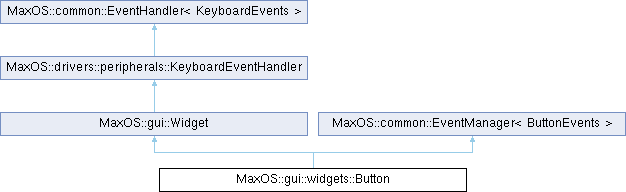
Public Member Functions | |
| Button (int32_t left, int32_t top, uint32_t width, uint32_t height, const string &text) | |
| Construct a new Button object at a specific position and size with text. | |
| void | draw (common::GraphicsContext *gc, common::Rectangle< int32_t > &area) override |
| Draws the button. | |
| drivers::peripherals::MouseEventHandler * | on_mouse_button_pressed (uint32_t x, uint32_t y, uint8_t button) override |
| Handles the mouse button pressed event. | |
| void | on_mouse_button_released (uint32_t x, uint32_t y, uint8_t button) override |
| Handles the mouse button released event. | |
 Public Member Functions inherited from MaxOS::gui::Widget Public Member Functions inherited from MaxOS::gui::Widget | |
| Widget () | |
| Construct a new Widget object. | |
| Widget (int32_t left, int32_t top, uint32_t width, uint32_t height) | |
| Construct a new Widget object at a specific position and size. | |
| void | invalidate () |
| Invalidates the entire widget. This forces the widget to be redrawn on the next screen update. | |
| virtual void | invalidate (common::Rectangle< int32_t > &area) |
| Invalidates a specific area of the widget. This forces that part of the screen to be redrawn on the next screen update. | |
| virtual void | add_child (Widget *child) |
| Set the parent of a widget to this widget, making it into a child. | |
| virtual common::Coordinates | absolute_coordinates (common::Coordinates coordinates) |
| Get the absolute coordinates of the widget (relative to the screen) | |
| virtual bool | contains_coordinate (uint32_t x, uint32_t y) |
| Check if the widget contains a specific coordinate. | |
| common::Rectangle< int32_t > | position () |
| Get the position of the widget. | |
| void | move (int32_t left, int32_t top) |
| Set the position of the widget, and invalidate the old and new positions so they are redrawn. | |
| void | resize (int32_t width, int32_t height) |
| Set the size of the widget, and invalidate the old and new positions so they are redrawn. | |
| void | focus () |
| Set the current focused widget to be this widget. | |
| virtual void | on_focus () |
| Handles the event when the widget is focussed. | |
| virtual void | on_focus_lost () |
| Handles the event when the widget is unfocused. | |
| void | bring_to_front () |
| Brings this widget to the front of the screen. | |
| virtual void | on_mouse_enter_widget (uint32_t to_x, uint32_t to_y) |
| Handles the event when the mouse is moved on to the widget. | |
| virtual void | on_mouse_leave_widget (uint32_t from_x, uint32_t from_y) |
| Handles the event when the mouse is moved out of the widget. | |
| virtual void | on_mouse_move_widget (uint32_t from_x, uint32_t from_y, uint32_t to_x, uint32_t to_y) |
| Handles the event when the mouse is moved over the widget. | |
| Public Member Functions inherited from MaxOS::drivers::peripherals::KeyboardEventHandler | |
| common::Event< KeyboardEvents > * | on_event (common::Event< KeyboardEvents > *) override |
| Handle the trigger of an event. | |
| virtual void | on_key_down (KeyCode, const KeyboardState &) |
| Handle the key down event. | |
| virtual void | on_key_up (KeyCode, const KeyboardState &) |
| Handle the key up event. | |
| Public Member Functions inherited from MaxOS::common::EventHandler< KeyboardEvents > | |
| virtual Event< KeyboardEvents > * | on_event (Event< KeyboardEvents > *event) |
| This function is called when an event is raised. | |
| Public Member Functions inherited from MaxOS::common::EventManager< ButtonEvents > | |
| void | connect_event_handler (EventHandler< ButtonEvents > *handler) |
| connect an event handler to the event manager if it is not already connected | |
| void | disconnect_event_handler (EventHandler< ButtonEvents > *handler) |
| disconnect an event handler from the event manager if it is connected | |
| Vector< Event< ButtonEvents > * > | raise_event (Event< ButtonEvents > *event) |
| Calls the on_event function of all the event m_handlers connected to the event manager and returns a list of the results. | |
Public Attributes | |
| common::Colour | background_colour |
| The colour of the button background. | |
| common::Colour | foreground_colour |
| The colour of the button text. | |
| common::Colour | border_colour |
| The colour of the bar around the button. | |
| gui::Font | font |
| The font to use for the button text. | |
| string | text |
| The text to display on the button. | |
Additional Inherited Members | |
| Protected Member Functions inherited from MaxOS::gui::Widget | |
| virtual void | set_focus (Widget *) |
| Sets the widget that is currently focussed. | |
| virtual void | bring_to_front (Widget *) |
| Brings a specific widget to the front of the screen. | |
| Protected Attributes inherited from MaxOS::gui::Widget | |
| common::Rectangle< int32_t > | m_position |
| The position and size of the widget (relative to its parent) | |
| Widget * | m_parent { nullptr } |
| The widget that owns this widget. | |
| bool | m_valid { false } |
| Is the widget drawn to the screen and up to date. | |
| uint32_t | m_min_width { 5 } |
| The smallest m_width the widget can be resized to. | |
| uint32_t | m_min_height { 5 } |
| The smallest m_height the widget can be resized to. | |
| uint32_t | m_max_width { 0x8FFFFFFF } |
| The largest m_width the widget can be resized to. | |
| uint32_t | m_max_height { 0x8FFFFFFF } |
| The largest m_height the widget can be resized to. | |
| Protected Attributes inherited from MaxOS::common::EventManager< ButtonEvents > | |
| Vector< EventHandler< ButtonEvents > * > | m_handlers |
Construct a new Button object at a specific position and size with text.
| left | How many pixels from the left of the parent widget the button is |
| top | How many pixels from the top of the parent widget the button is |
| width | How many pixels wide the button is |
| height | How many pixels tall the button is |
| text | The text to display on the button |
Definition at line 71 of file button.cpp.
|
overridevirtual |
Draws the button.
| gc | The graphics context to draw to |
| area | The area to draw to |
Reimplemented from MaxOS::gui::Widget.
Definition at line 90 of file button.cpp.
References MaxOS::gui::Widget::absolute_coordinates(), background_colour, border_colour, MaxOS::gui::Widget::draw(), MaxOS::gui::Font::draw_text(), font, foreground_colour, MaxOS::common::Rectangle< Type >::height, MaxOS::common::Rectangle< Type >::intersects(), MaxOS::common::Rectangle< Type >::left, MaxOS::gui::Widget::position(), text, MaxOS::common::Rectangle< Type >::top, and MaxOS::common::Rectangle< Type >::width.
|
overridevirtual |
Handles the mouse button pressed event.
| x | The x m_position of the mouse |
| y | The y m_position of the mouse |
| button | The button that was pressed |
Reimplemented from MaxOS::gui::Widget.
Definition at line 158 of file button.cpp.
References background_colour, MaxOS::gui::Widget::invalidate(), MaxOS::gui::Widget::on_mouse_button_pressed(), and MaxOS::common::EventManager< ButtonEvents >::raise_event().
Handles the mouse button released event.
| x | The x m_position of the mouse |
| y | The y m_position of the mouse |
| button | The button that was released |
Reimplemented from MaxOS::gui::Widget.
Definition at line 178 of file button.cpp.
References background_colour, MaxOS::gui::Widget::invalidate(), MaxOS::gui::Widget::on_mouse_button_released(), and MaxOS::common::EventManager< ButtonEvents >::raise_event().
| common::Colour MaxOS::gui::widgets::Button::background_colour |
The colour of the button background.
Definition at line 88 of file button.h.
Referenced by draw(), on_mouse_button_pressed(), and on_mouse_button_released().
| common::Colour MaxOS::gui::widgets::Button::border_colour |
| gui::Font MaxOS::gui::widgets::Button::font |
| common::Colour MaxOS::gui::widgets::Button::foreground_colour |
| string MaxOS::gui::widgets::Button::text |
 1.9.8
1.9.8